Generative UI can have many forms and many interpretations, but most products on the market haven't really integrated it in its truest form.
Traditional chatbots give you text. Maybe some markdown, maybe a code block, maybe a table. The interface is always the same regardless of what you asked. Generative UI completely changes that. The interface itself adapts to the task. You ask about a portfolio of stocks, let's say, and you get an interactive chart or some kind of bespoke table that models your data in a particular way. You book a flight and you get a form with date pickers and seat selectors. The model decides what you see, on the fly, instead of some product designer who made a guess six months ago.
So why hasn't this taken off in a big way yet? A few reasons.
One, it's hard to implement this well. You need a tight feedback loop between the model's reasoning and your component system, and most frontend architectures just aren't built for that.
Two, it's expensive, and the cost compounds at every level of ambition.
Three, LLMs are unwieldy and can be difficult to corral. Without structured outputs, type-safe schemas, and strict validation at the tool boundary, you get hallucinated component props, malformed layouts, and a broken UI. The things that make this reliable are boring. Zod schemas for tool definitions, JSON structured outputs. They tame the chaos, but they're not sexy, so most founders will opt to leave them out of the demo video.
And four, there's generally no consensus on what generative UI even is. Everyone seems to mean something slightly different. So here's a framework of the different levels, from basic to fully autonomous UI generation, and what they mean.
Level 0 — Deterministic Tool Routing
You have an orchestration layer, some kind of router, that takes in a user request and deterministically routes it to a specialist agent based on rules. An agent in this context is just an LLM with a specific role and a set of tools it can call. If the user asks about weather, the weather agent handles it. If they ask about finance, the finance agent handles it, and so on.
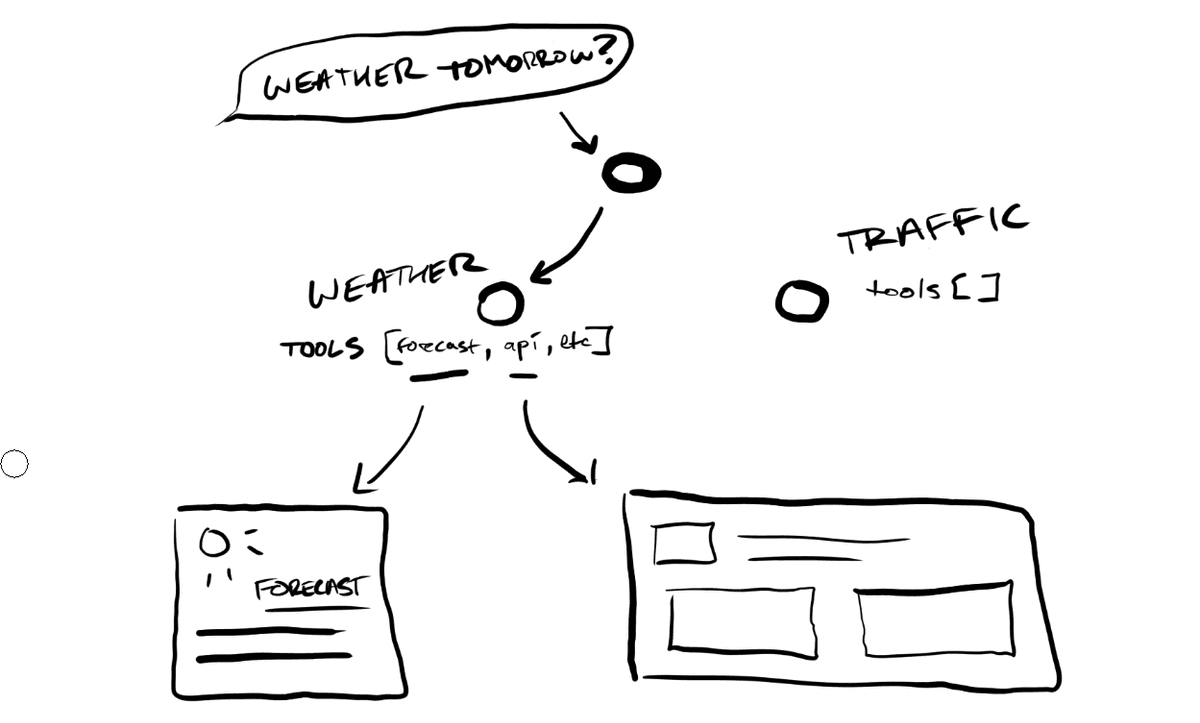
Each agent has a fixed set of tools it can pull from, and each tool maps to a specific UI component. A weather tool returns data and the weather card gets rendered. A finance tool returns finance data and the stock chart gets rendered, let's say. There's no decision-making about what to show. The mapping from intent to component is hardcoded. You can think of it like a simple switch statement that returns UI.
Cost-wise, this is pretty cheap, right? One routing decision, one tool call, one component render. The ceiling is also obvious. You can only show UI that you've explicitly wired up. If a user asks something that doesn't match your routing rules, you've got nothing. And generally, as a rule of thumb in gen-AI world, it's almost always better to show nothing than to hallucinate something wrong or something superfluous.
Level 1 — Agentic Tool Selection
Instead of deterministic routing, each agent autonomously decides which of its tools to invoke based on the context. A finance agent might look at your query and decide: this needs a comparison table, not a line chart. Or it might decide it needs to call two tools and compose the results. The model is making judgment calls about what to surface based on the nature of the data and the intent of the request.
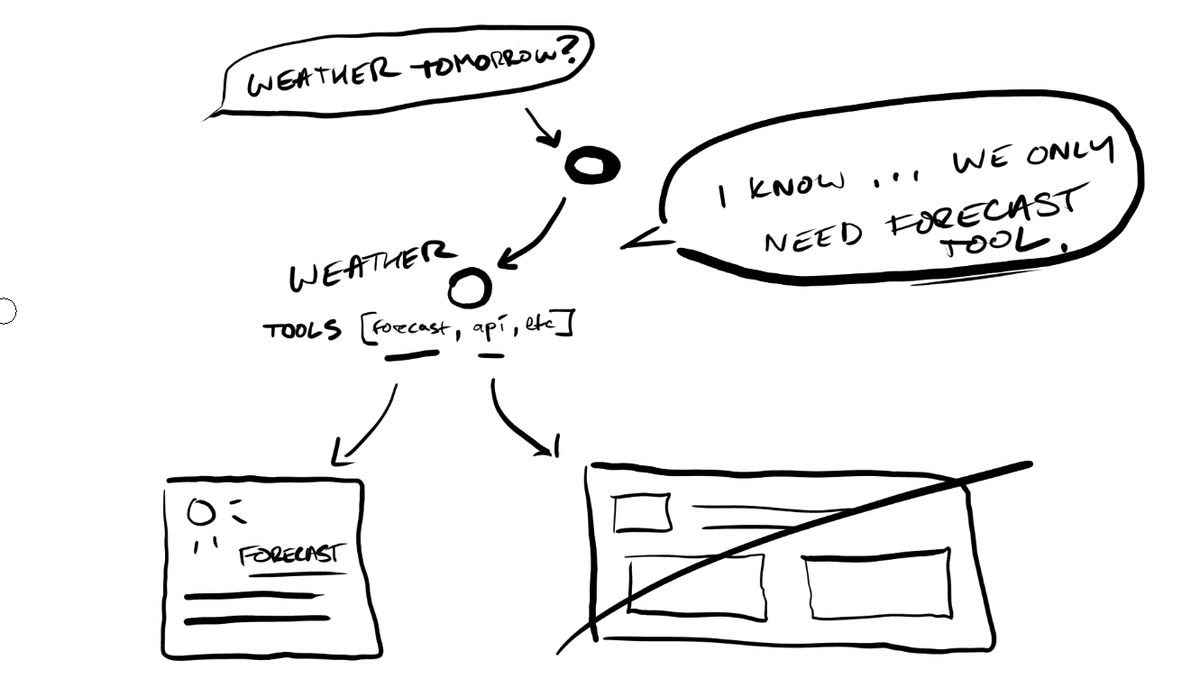
The components themselves are still pre-built. You're pulling from a library of known components. But which ones appear and in what combination is up to the agent.
This is where frameworks like the Vercel AI SDK operate. Tools are defined with typed schemas, the model calls them via function calling, and each tool returns a React component that streams into the UI progressively as the model generates. The streaming matters. The UI doesn't wait for the full response. Components render incrementally as the LLM produces output, so the user sees the interface taking shape instead of staring at a spinner or a loading skeleton.
The cost goes up here too. Each request now involves inference for tool selection, not just routing. You're paying for the model to think about what to show. The constraint is that you're still limited to pre-built components. If the task calls for a layout you didn't anticipate when you built your component library, you're kind of stuck with what you have.
Level 2 — Dynamic Composition
Here the agent stops picking from a shelf and starts building. Instead of selecting pre-built composite components, it composes layouts from primitive building blocks. Your buttons, your inputs, your selects, your cards, your grids. It takes all of these and assembles them into arrangements that best suit the task at hand.
Say a user asks your HR agent to set up a new employee. There's no single composite "onboarding form" component. The agent simply decides it needs a name field, a department dropdown, a start date picker, a manager selector, and a permissions checklist, arranged in a particular layout that doesn't necessarily correspond to any template you built ahead of time. It's deciding how information should be organized, on the fly, for this specific request.
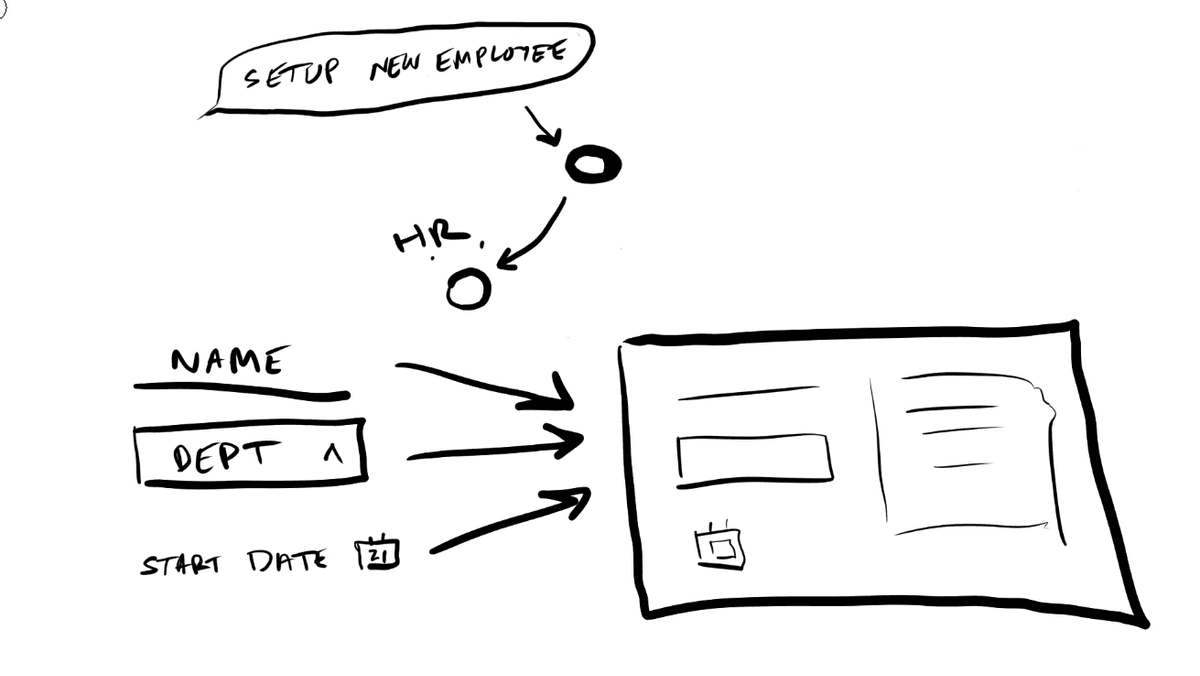
This is the level where state management in your application becomes a really hard problem. If the agent composes a form on the fly, can that form actually submit data? Can a generated dropdown update other generated components, let's say? You need some kind of contract between your component primitives and your application state that's flexible enough to handle compositions the agent invents, but rigid enough to actually function. It's a hard problem. A lot of generative UI implementations hit a wall right here.
You also need a fallback strategy. What happens when the agent makes a bad composition choice? Maybe it arranges components in a way that doesn't make visual sense or doesn't make thematic sense, or combines primitives that conflict with each other. You need some sort of graceful degradation, almost like a validation layer. It needs to catch a broken layout and fall back to some known-good, known-safe component rather than rendering garbage.
The cost multiplies again. The agent is reasoning about composition, making multiple tool calls, assembling layouts, validating them. More tokens, more latency, more inference, more cost. Streaming gets harder too. You're not rendering a single component progressively anymore. You're streaming an entire layout as the model reasons and re-reasons through its structure.
But the constraint that remains is behavior. The agent can arrange components however it wants, but what each component actually does is still predetermined. A button can submit a form. A card can expand. A text output can render to PDF. All of these actions are fixed and determined ahead of time.
Level 3 — Autonomous Presentation and Behavior
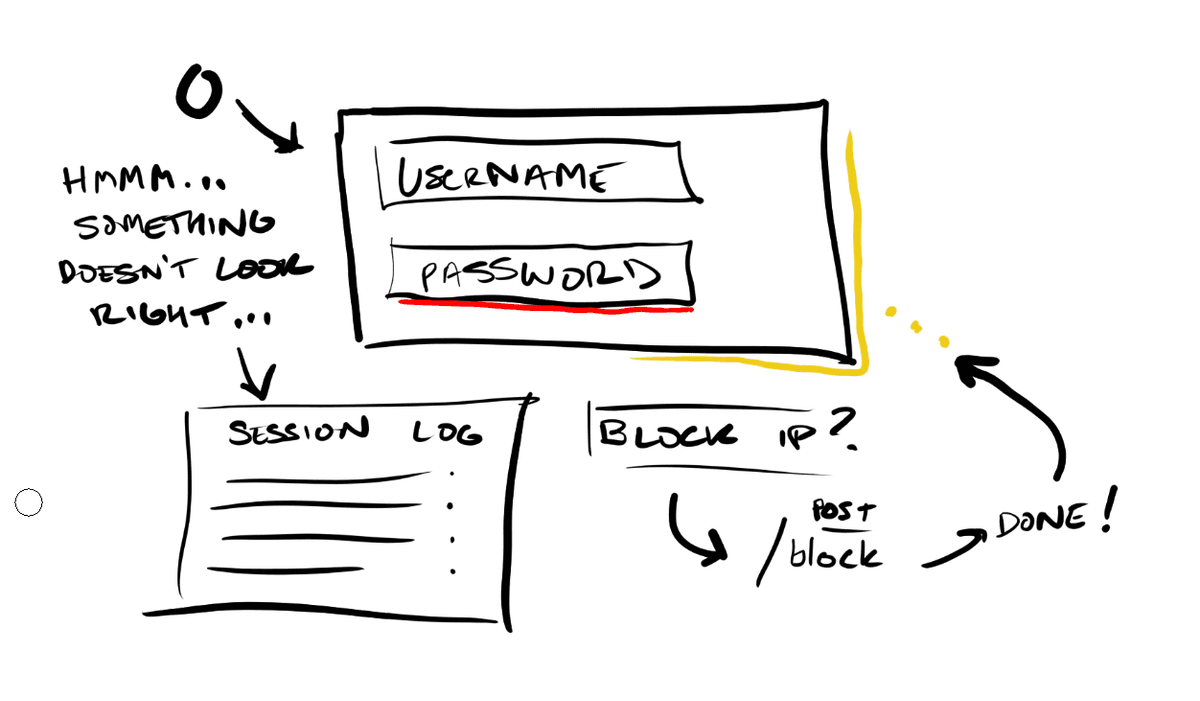
Here that last constraint breaks. The agent controls which components appear, how they're arranged, how they look, and what they actually do. Before this level, every component had a fixed set of actions. A card can export to PDF. A button has an onClick that sends data to some API, let's say. At Level 3, the agent defines the callbacks, the interaction patterns, and the styling itself.
Imagine a security dashboard where the agent detects some anomalous login pattern. At Level 2, it could compose a chart and a data table side by side. At Level 3, it highlights the anomalous data points in red in real time, adds a click handler to each one that pulls up the full session log, generates a "block this user's IP" button that calls your firewall API, and styles the entire panel with a visual urgency treatment that doesn't exist in your design system. The agent invented that interaction on the fly because the situation called for it.
This is also where the security conversation becomes unavoidable. Arbitrary code execution in a UI context means you're, at any given moment, one bad prompt injection away from cross-site scripting attacks, data exfiltration via SQL injection, or worse. Any Level 3 implementation needs serious forethought and serious sandboxing. Isolated execution environments, content security policies, strict output sanitization, and probably some kind of human in the loop or an extremely smart and opinionated agentic review layer between what the model generates and what actually renders on the page. The attack surface scales with the capability. I think probably nobody's fully solved this yet, and I'd bet that anyone who tells you they have is either partially lying or not thinking adversarially enough.
Cost here is the highest by far. The model is reasoning about presentation, behavior, and interaction patterns on every single request. Most production systems today live at Level 1, maybe dipping into Level 2 for specific use cases. Level 3 is mostly research and demos at this point.
Where This Is Going
Okay, so where is all this going, right? Frameworks like the Vercel AI SDK have made something like Level 1 very accessible. We have typed tool schemas, function calling, streaming React components. Level 2 is emerging in some forms, in bits and pieces, in more ambitious agent frameworks. And Level 3 is where the most ambitious players want to be, but the security and reliability problems are real and mostly unsolved.
There's a lot of distance between where the tooling is today and where the ideas are. And that distance is where a lot of the really interesting work in UI is happening right now.